摘要函数
模型上下文协议的智能文本摘要
功能• AI 代理集成•安装•使用


概述
强大的 MCP 服务器,通过简洁、可扩展的架构提供智能摘要功能。它基于现代 TypeScript 构建,旨在与 AI 工作流无缝集成。
Related MCP server: Datetime MCP Server
安装
通过 Smithery 安装
要通过Smithery自动安装 Claude Desktop 的摘要功能:
npx -y @smithery/cli install mcp-summarization-functions --client claude
npm i mcp-summarization-functions
AI代理集成
该 MCP 服务器主要是为了提升 Roo Cline 和 Cline 等 AI 代理的性能和可靠性而开发的。它解决了 AI 代理操作中的一个关键挑战:上下文窗口管理。
上下文窗口优化
AI 代理经常会遇到这样的情况:它们的上下文窗口会迅速被来自以下方面的大量输出填满:
命令执行结果
文件内容读数
目录列表
API 响应
错误消息和堆栈跟踪
该服务器通过以下方式帮助维持高效的上下文使用:
提供简洁、相关的摘要,而不是完整的内容
存储完整内容以供需要时参考
根据特定需求(安全性、API 界面等)提供重点分析
支持多种输出格式以实现最佳上下文利用率
人工智能代理的优势
降低故障率:通过防止上下文窗口溢出
提高响应质量:通过重点突出、相关的摘要
提高效率:通过保留重要背景信息并减少噪音
更好的资源管理:通过智能内容缓存和检索
灵活集成:支持多个 AI 提供商和配置选项
推荐的AI代理提示
与 AI 代理集成时,请在代理的指令中包含以下内容:
# CONTEXT MANAGEMENT
You have access to summarization functions through the MCP server. These functions are NOT optional - you MUST use them for ALL potentially large outputs to prevent context overflow:
MANDATORY SUMMARIZATION:
- You MUST ALWAYS use summarization functions for:
- ANY first time file reading operations (unless you are CERTAIN its small and you are going to edit it)
- ALL command execution outputs
- EVERY directory analysis
- ANY API responses or error logs
- ANY output that could be large
NEVER attempt to process raw output directly - ALWAYS use the appropriate summarization function:
• For commands: summarize_command
• For files: summarize_files
• For directories: summarize_directory
• For other text: summarize_text
ALWAYS utilize available features:
• Specify hints for focused analysis
• Choose appropriate output formats
• Use content IDs to access full details only when absolutely necessary
There is NO NEED to process perfect or complete output. Summarized content is ALWAYS preferred over raw data. When in doubt, use summarization.
Ollama 存储库中的操作摘要(Gemini 2.0 Flash 摘要、Claude 3.5 代理)
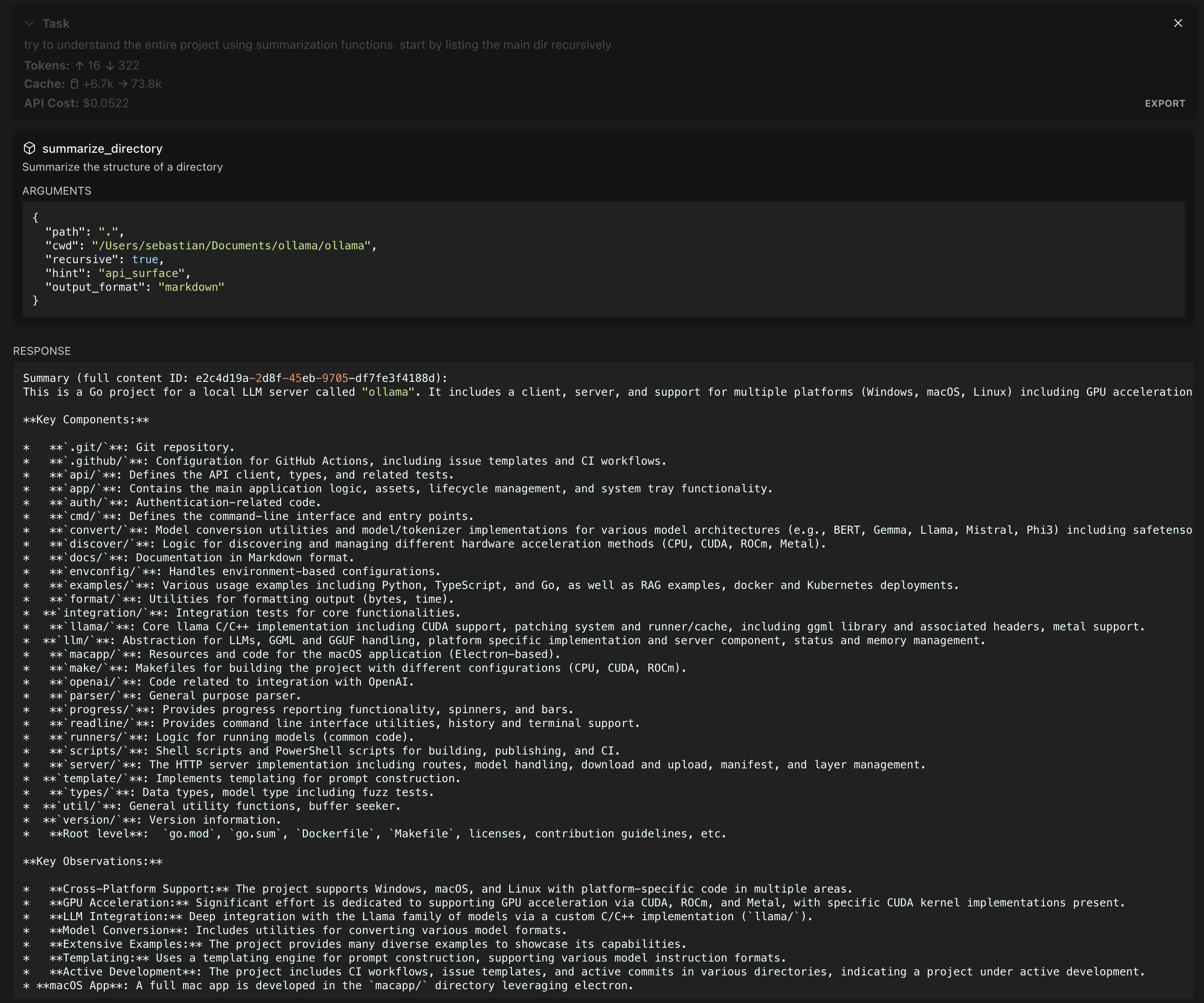
特征
配置
服务器通过环境变量支持多个AI提供者:
必需的环境变量
可选环境变量
MODEL_ID :要使用的特定模型(默认为提供商的标准模型)
PROVIDER_BASE_URL :与 OpenAI 兼容的提供商的自定义 API 端点
MAX_TOKENS :模型响应的最大令牌数(默认值:1024)
SUMMARIZATION_CHAR_THRESHOLD :汇总时的字符数阈值(默认值:512)
SUMMARIZATION_CACHE_MAX_AGE :缓存持续时间(以毫秒为单位)(默认值:3600000 - 1 小时)
MCP_WORKING_DIR - 用于尝试从中查找具有相对路径的文件的后备目录
示例配置
# Anthropic Configuration
PROVIDER=ANTHROPIC
API_KEY=your-anthropic-key
MODEL_ID=claude-3-5-sonnet-20241022
# OpenAI Configuration
PROVIDER=OPENAI
API_KEY=your-openai-key
MODEL_ID=gpt-4-turbo-preview
# Azure OpenAI Configuration
PROVIDER=OPENAI-COMPATIBLE
API_KEY=your-azure-key
PROVIDER_BASE_URL=https://your-resource.openai.azure.com
MODEL_ID=your-deployment-name
# Google Configuration
PROVIDER=GOOGLE
API_KEY=your-google-key
MODEL_ID=gemini-2.0-flash-exp
用法
将服务器添加到您的 MCP 配置文件:
{
"mcpServers": {
"MUST_USE_summarization": {
"command": "node",
"args": ["path/to/summarization-functions/build/index.js"],
"env": {
"PROVIDER": "ANTHROPIC",
"API_KEY": "your-api-key",
"MODEL_ID": "claude-3-5-sonnet-20241022",
"MCP_WORKING_DIR": "default_working_directory"
}
}
}
}
可用函数
服务器提供以下摘要工具:
summarize_command
执行并总结命令输出。
{
// Required
command: string, // Command to execute
cwd: string, // Working directory for command execution
// Optional
hint?: string, // Focus area: "security_analysis" | "api_surface" | "error_handling" | "dependencies" | "type_definitions"
output_format?: string // Format: "text" | "json" | "markdown" | "outline" (default: "text")
}
summarize_files
总结文件内容。
{
// Required
paths: string[], // Array of file paths to summarize (relative to cwd)
cwd: string, // Working directory for resolving file paths
// Optional
hint?: string, // Focus area: "security_analysis" | "api_surface" | "error_handling" | "dependencies" | "type_definitions"
output_format?: string // Format: "text" | "json" | "markdown" | "outline" (default: "text")
}
summarize_directory
获取目录结构概览。
{
// Required
path: string, // Directory path to summarize (relative to cwd)
cwd: string, // Working directory for resolving directory path
// Optional
recursive?: boolean, // Whether to include subdirectories. Safe for deep directories
hint?: string, // Focus area: "security_analysis" | "api_surface" | "error_handling" | "dependencies" | "type_definitions"
output_format?: string // Format: "text" | "json" | "markdown" | "outline" (default: "text")
}
summarize_text
概括任意文本内容。
{
// Required
content: string, // Text content to summarize
type: string, // Type of content (e.g., "log output", "API response")
// Optional
hint?: string, // Focus area: "security_analysis" | "api_surface" | "error_handling" | "dependencies" | "type_definitions"
output_format?: string // Format: "text" | "json" | "markdown" | "outline" (default: "text")
}
get_full_content
检索给定摘要 ID 的完整内容。
{
// Required
id: string // ID of the stored content
}
执照
麻省理工学院
