Glama

Postman MCP 服务器

铁匠徽章

一个 MCP(模型上下文协议)服务器,支持使用 Newman 运行 Postman 集合。该服务器允许 LLM 执行 API 测试并通过标准化接口获取详细结果。
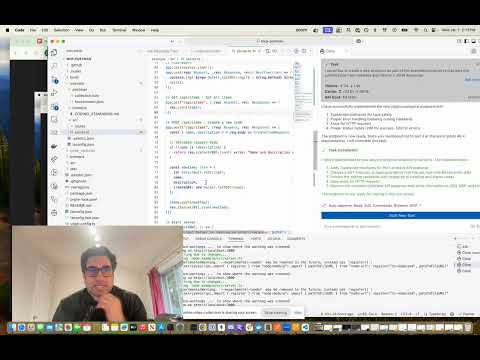
MCP Postman 服务器演示

特征

  • 使用 Newman 运行 Postman 集合

  • 支持环境文件

  • 支持全局变量

  • 详细测试结果包括:

    • 总体成功/失败状态

    • 测试摘要(总计、通过、未通过)

    • 详细故障信息

    • 执行时间

Related MCP server: Postman Tool Generation MCP Server

安装

通过 Smithery 安装

要通过Smithery自动为 Claude Desktop 安装 Postman Runner:

npx -y @smithery/cli install mcp-postman --client claude

手动安装

# Clone the repository git clone <repository-url> cd mcp-postman # Install dependencies pnpm install # Build the project pnpm build

用法

配置

将服务器添加到您的 Claude 桌面配置文件~/Library/Application Support/Claude/claude_desktop_config.json

{ "mcpServers": { "postman-runner": { "command": "node", "args": ["/absolute/path/to/mcp-postman/build/index.js"] } } }

可用工具

运行收集

运行 Postman 集合并返回测试结果。

参数:

  • collection (必需):Postman collection 的路径或 URL

  • environment (可选):环境文件的路径或 URL

  • globals (可选):全局文件的路径或 URL

  • iterationCount (可选):要运行的迭代次数

响应示例:

{ "success": true, "summary": { "total": 5, "failed": 0, "passed": 5 }, "failures": [], "timings": { "started": "2024-03-14T10:00:00.000Z", "completed": "2024-03-14T10:00:01.000Z", "duration": 1000 } }

Claude 中的示例用法

您可以通过要求 Claude 中的服务器运行 Postman 集合来使用它:

“在 /path/to/collection.json 运行 Postman 集合并告诉我所有测试是否通过”

克劳德将:

  1. 使用运行收集工具

  2. 分析测试结果

  3. 提供人性化的执行摘要

发展

项目结构

src/ ├── index.ts # Entry point ├── server/ │ ├── server.ts # MCP Server implementation │ └── types.ts # Type definitions └── newman/ └── runner.ts # Newman runner implementation test/ ├── server.test.ts # Server tests ├── newman-runner.test.ts # Runner tests └── fixtures/ # Test fixtures └── sample-collection.json

运行测试

# Run tests pnpm test # Run tests with coverage pnpm test:coverage

建筑

# Build the project pnpm build # Clean build artifacts pnpm clean

贡献

  1. 分叉存储库

  2. 创建你的功能分支( git checkout -b feature/amazing-feature

  3. 提交您的更改( git commit -m 'Add some amazing feature'

  4. 推送到分支( git push origin feature/amazing-feature

  5. 打开拉取请求

执照

国际学习中心

One-click Deploy
A
security – no known vulnerabilities
A
license - permissive license
A
quality - confirmed to work

Latest Blog Posts

MCP directory API

We provide all the information about MCP servers via our MCP API.

curl -X GET 'https://glama.ai/api/mcp/v1/servers/Gechmind/mcp-postman'

If you have feedback or need assistance with the MCP directory API, please join our Discord server