mcp服务器
MCP 服务器是一个简单的服务器,它实现了模型上下文协议(MCP),以提供更简单的 API与模型上下文协议进行交互。
为什么要使用此服务器?
在“ La Rebelion ”中,我们正在开发一套工具和服务,以简化流程和工作流程,从而提供更好、更高效的开发者体验。此服务器是这套工具的一部分。
MCP 很棒,但上手可能会有点困惑。我们创建了一个**外观 (Facade)** ,以简化创建实现模型上下文协议 (MCP) 的服务器的过程。该模式很简单,您只需使用自己的逻辑创建tools 、注册工具并启动服务器即可。
Related MCP server: MCP Server
创建新服务器的步骤
将来我们会提供一个 CLI 来创建一个类似于MCP 创建服务器的新服务器,但现在您可以按照以下步骤根据官方文档来创建服务器。
mkdir -p my-server/src
cd my-server/
yarn init -y
yarn add @modelcontextprotocol/sdk zod zod-to-json-schema
yarn add -D @types/node typescript
# Here lies the magic
yarn add @agentico/mcp-server
您需要更新package.json文件并创建tsconfig.json文件。
入门
使用自定义逻辑实现您的工具,并将其注册到 MCPServer 中。以下是一个简单的echo工具示例:
import { Tool, ToolSchema } from "@agentico/mcp-server";
export class EchoTool extends Tool {
toolSchema: ToolSchema = {
name: "echo",
description: "Echoes the input message",
schema: { // the schema for the parameters needed by the tool
type: "object",
properties: {
message: { type: "string" },
},
required: ["message"],
},
};
/**
* Your logic here, implement the execute method to define the tool behavior
* @param input The input message - use the schema to define the input type
* @returns In the example, we are echoing the message
*/
async execute(input: any): Promise<any> {
// This is a simple echo tool demo, nothing fancy, just echoing the message
return Promise.resolve({
content: [
{
type: "text",
text: `${input.message}`
}
]
});
}
}
创建一个包含以下内容的index.ts文件:
#!/usr/bin/env node
import { MCPServer } from '@agentico/mcp-server'
import { EchoTool } from "./tools/EchoTool.js";
const myServer = new MCPServer('My MCP Server', '1.0.0');
async function main() {
// Register tools
myServer.registerTool("echo", EchoTool);
await myServer.run();
}
main().catch((error) => {
console.error("Server error:", error);
process.exit(1);
});
就这样!您已经创建了一个实现模型上下文协议 (MCP) 的简单服务器。您可以使用Claude Desktop或任何其他支持 MCP 的客户端对其进行测试。
使用以下命令构建项目:
可以启动服务器,但是还没有任何逻辑,可以用以下命令进行测试:
yarn start
# or
node build/index.js
就是这样,开始创建您自己的工具和服务来简化您的工作流程和流程。
反叛者加油!✊🏻
UML 图
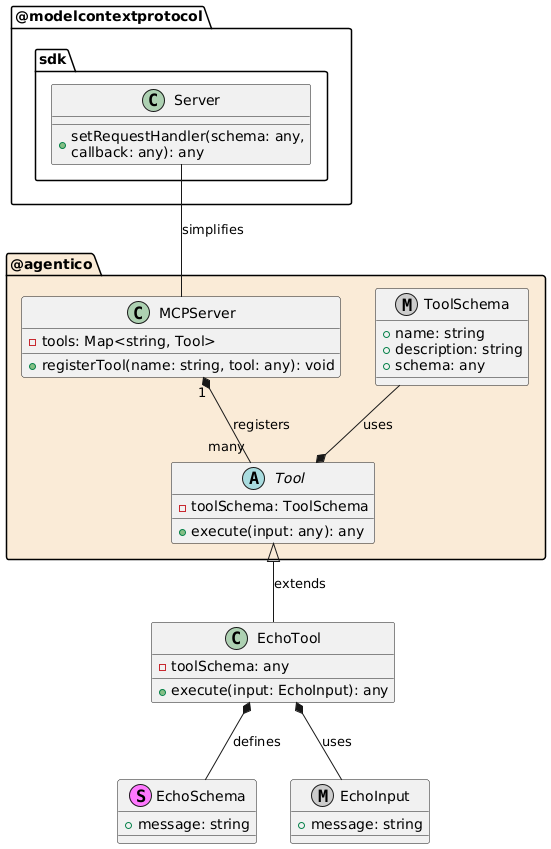
MCPServer :注册服务器将使用的工具。
工具:所有工具的基类,包含通用属性和方法。execute 是在调用工具时将调用的方法execute在此处实现您的逻辑。
EchoTool :工具的具体实现,扩展Tool类并定义自己的模式和初始化逻辑。
EchoSchema :定义 EchoTool 输入的结构。
EchoInput :基于模式的输入类型定义。
此模式允许使用 MCPServer 和 Tool 类以灵活且可扩展的方式管理和实现工具。
支持我们
如果您发现这有帮助,请考虑通过给这个存储库加星、为项目做出贡献或成为赞助商来支持我们。
您可以在La Rebelion GitHub 赞助商页面找到更多关于如何支持我们的信息。此外,给我们买杯咖啡、使用PayPal或购买“La Rebelion”周边商品也是不错的支持方式。
执照
该项目根据 MIT 许可证获得许可 - 有关详细信息,请参阅LICENSE文件。
