Manages environment variables for configuration, including storing API keys for OpenAI and Gemini models.
Hosts the repository for the Agentic RAG with MCP Server project, allowing users to clone and access the codebase.
Powers entity extraction, query refinement, and relevance checking capabilities, enabling enhanced document retrieval and processing in the Agentic RAG system.
🚀 Agentic RAG with MCP Server 
✨ Overview
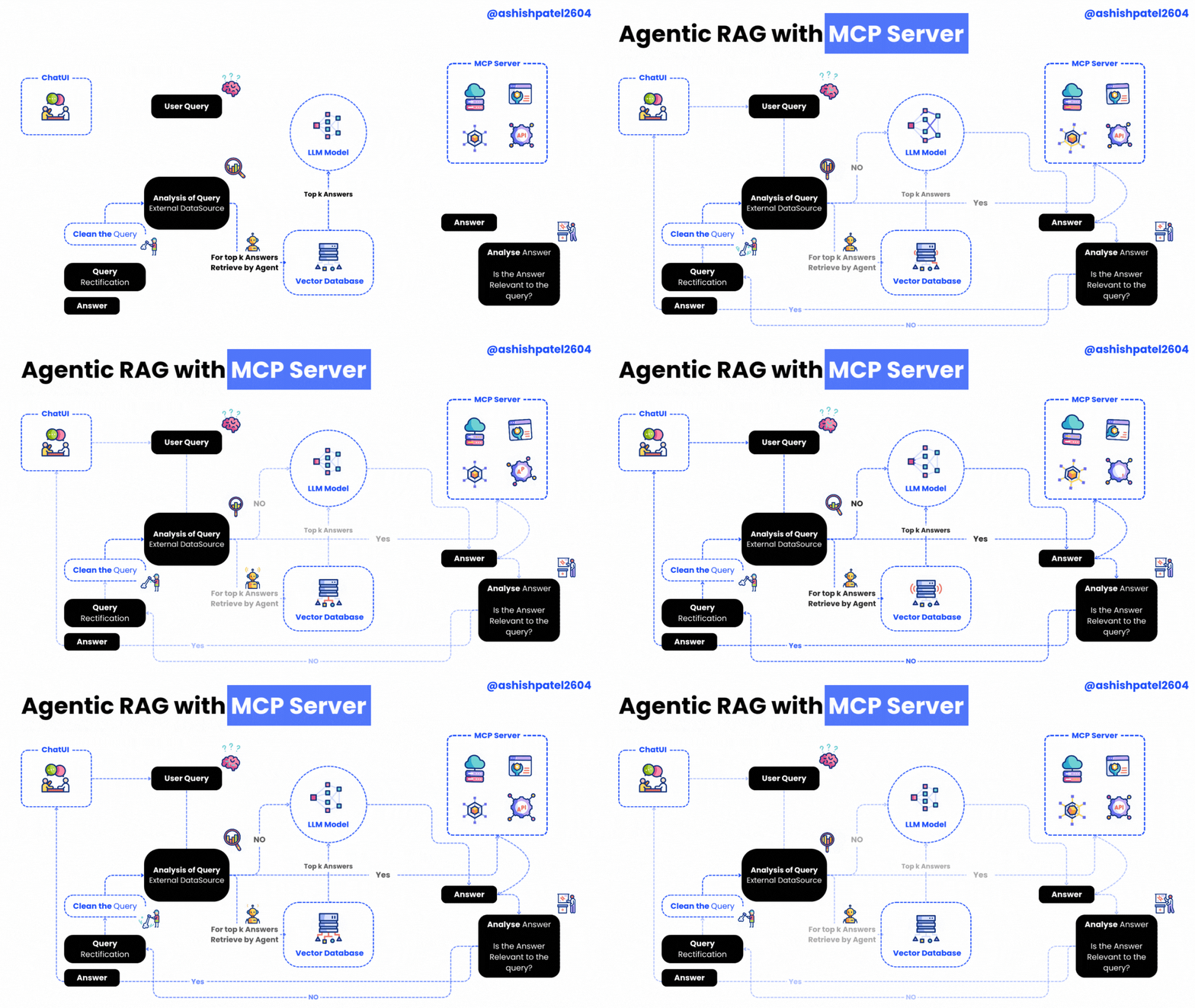
Agentic RAG with MCP Server is a powerful project that brings together an MCP (Model Context Protocol) server and client for building Agentic RAG (Retrieval-Augmented Generation) applications.
This setup empowers your RAG system with advanced tools such as:
🕵️♂️ Entity Extraction
🔍 Query Refinement
✅ Relevance Checking
The server hosts these intelligent tools, while the client shows how to seamlessly connect and utilize them.
Related MCP server: Shared Knowledge MCP Server
🖥️ Server — server.py
Powered by the FastMCP class from the mcp library, the server exposes these handy tools:
Tool Name | Description | Icon |
| Returns the current date & time | ⏰ |
| Uses OpenAI to extract entities from a query — enhancing document retrieval relevance | 🧠 |
| Improves the quality of user queries with OpenAI-powered refinement | ✨ |
| Filters out irrelevant content by checking chunk relevance with an LLM | ✅ |
🤝 Client — mcp-client.py
The client demonstrates how to connect and interact with the MCP server:
Establish a connection with
ClientSessionfrom themcplibraryList all available server tools
Call any tool with custom arguments
Process queries leveraging OpenAI or Gemini and MCP tools in tandem
⚙️ Requirements
Python 3.9 or higher
openaiPython packagemcplibrarypython-dotenvfor environment variable management
🛠️ Installation Guide
🔐 Configuration
Create a
.envfile (use.env.sampleas a template)Set your OpenAI model in
.env:
🚀 How to Use
Start the MCP server:
Run the MCP client:
📜 License
This project is licensed under the MIT License.
Thanks for Reading 🙏