The TeslaMate MCP server enables AI assistants to query and analyze Tesla vehicle data from a TeslaMate PostgreSQL database through natural language.
Key Capabilities:
Vehicle Information: Retrieve basic details (VIN, model, color), current status (location, battery level, temperature), and software update history
Battery Analytics: Monitor health and degradation over time, track daily usage patterns
Driving Insights: Access monthly/daily summaries, identify longest drives, view total distance and efficiency metrics
Efficiency Analysis: Analyze trends by month and temperature, detect unusual power consumption
Charging Data: View all charging sessions and statistics by location
Location Tracking: Identify most visited places and analyze location patterns
Tire Monitoring: Track tire pressure trends over time
Custom Queries: Execute safe, read-only SQL SELECT queries with complete database schema access and built-in validation to prevent data modification
All data access is secure and read-only, making it safe for comprehensive Tesla vehicle data exploration and analysis.
Connects to a PostgreSQL database containing TeslaMate data to retrieve and analyze Tesla vehicle information.
Allows querying Tesla vehicle data from a TeslaMate database, providing access to vehicle information, driving statistics, charging data, battery health, efficiency metrics, and location analytics.
TeslaMate MCP Server
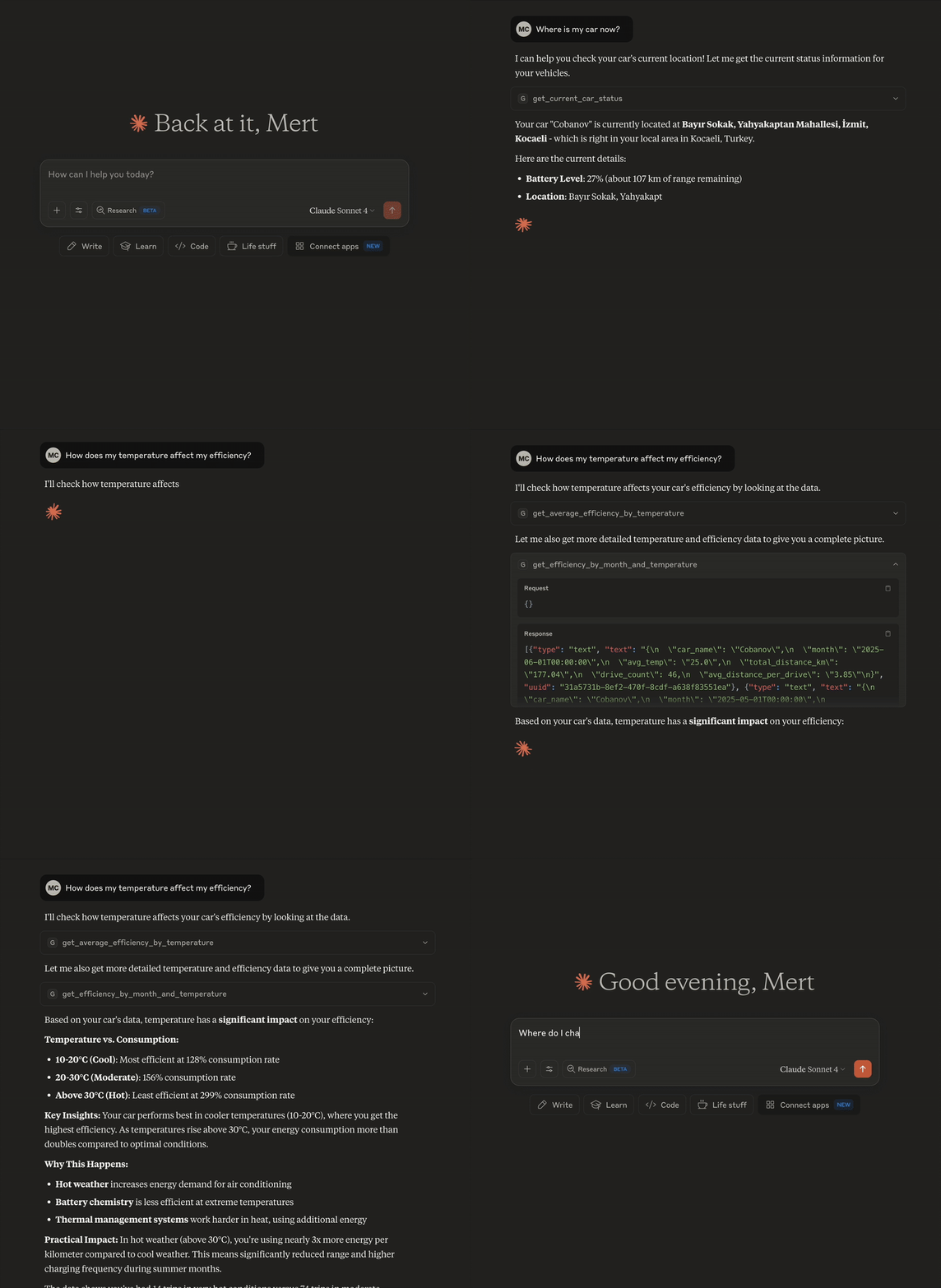
A Model Context Protocol (MCP) server that connects your TeslaMate database to AI assistants, enabling natural language queries about your Tesla data.
Features
🚗 18 Predefined Queries - Battery health, efficiency, charging, driving patterns, and more
🔍 Custom SQL Support - Execute safe SELECT queries with built-in validation
🗄️ Database Schema Access - Explore your TeslaMate database structure
🔒 Optional Authentication - Bearer token support for remote deployments
🏗️ Modular Architecture - Clean, maintainable codebase
Related MCP server: Tesla MCP Server
Prerequisites
TeslaMate running with PostgreSQL
Python 3.11+ (for local) or Docker (for remote)
Quick Start
Local Setup (Cursor/Claude Desktop)
Configure your MCP client:
Remote Setup (Docker)
Server available at: http://localhost:8888/mcp
Configuration
Create .env file:
Generate auth token (optional):
Available Tools
Predefined Queries (18 tools)
Vehicle Info:
get_basic_car_information- VIN, model, firmwareget_current_car_status- Real-time status, location, batteryget_software_update_history- Firmware update timeline
Battery & Health:
get_battery_health_summary- Current health metricsget_battery_degradation_over_time- Historical capacityget_daily_battery_usage_patterns- Usage patternsget_tire_pressure_weekly_trends- Tire pressure tracking
Driving Analytics:
get_monthly_driving_summary- Monthly statisticsget_daily_driving_patterns- Driving habitsget_longest_drives_by_distance- Top tripsget_total_distance_and_efficiency- Lifetime statsget_drive_summary_per_day- Daily summaries
Efficiency:
get_efficiency_by_month_and_temperature- Seasonal analysisget_average_efficiency_by_temperature- Temperature impactget_unusual_power_consumption- Anomaly detection
Charging & Location:
get_charging_by_location- Charging patternsget_all_charging_sessions_summary- Complete historyget_most_visited_locations- Frequent places
Custom Queries (2 tools)
get_database_schema- View database structurerun_sql- Execute custom SELECT queries (read-only, validated)
Example Queries
Project Structure
Development
Adding New Queries
Create SQL file in
queries/:
Add to
src/tools.py:
Restart server - tool auto-registers!
Testing
Security
Authentication: Optional bearer token for remote access
SQL Validation: Only SELECT queries allowed
Read-only: No data modification possible
Use HTTPS: In production environments
License
This project is licensed under the MIT License. See the LICENSE file for details.
Acknowledgments
TeslaMate - Tesla data logging
Model Context Protocol - AI integration protocol