The Code Reasoning MCP Server enhances Claude's ability to solve complex programming tasks through structured thinking. It allows you to:
Break down complex problems into manageable, self-auditing thought steps
Explore and manage multiple solution paths with branching and merging capabilities
Revise and refine reasoning as understanding improves
Handle multi-step planning, design, debugging, and open-ended analysis
Question assumptions and acknowledge uncertainty during the reasoning process
Automatically stop after 20 thought steps to prevent infinite loops
Use ready-made prompts tailored for common development tasks
Evaluate prompt effectiveness with a built-in system
Support structured JSON input with parameters for thought management
Engage in private reasoning before delivering final responses
Allows installation from source via the GitHub repository, providing access to the complete codebase for advanced customization and development.
Enables installation and execution of the code reasoning MCP server through the npm package registry, with support for both global installation and direct execution via npx.
Code Reasoning MCP Server
A Model Context Protocol (MCP) server that enhances Claude's ability to solve complex programming tasks through structured, step-by-step thinking.


Quick Installation
Configure Claude Desktop by editing:
macOS:
~/Library/Application Support/Claude/claude_desktop_config.jsonWindows:
%APPDATA%\Claude\claude_desktop_config.jsonLinux:
~/.config/Claude/claude_desktop_config.json
{ "mcpServers": { "code-reasoning": { "command": "npx", "args": ["-y", "@mettamatt/code-reasoning"] } } }Configure VS Code:
Related MCP server: Sequential Thinking Tool API
Usage
To trigger this MCP, append this to your chat messages:
Use sequential thinking to reason about this.Use ready-to-go prompts that trigger Code-Reasoning:
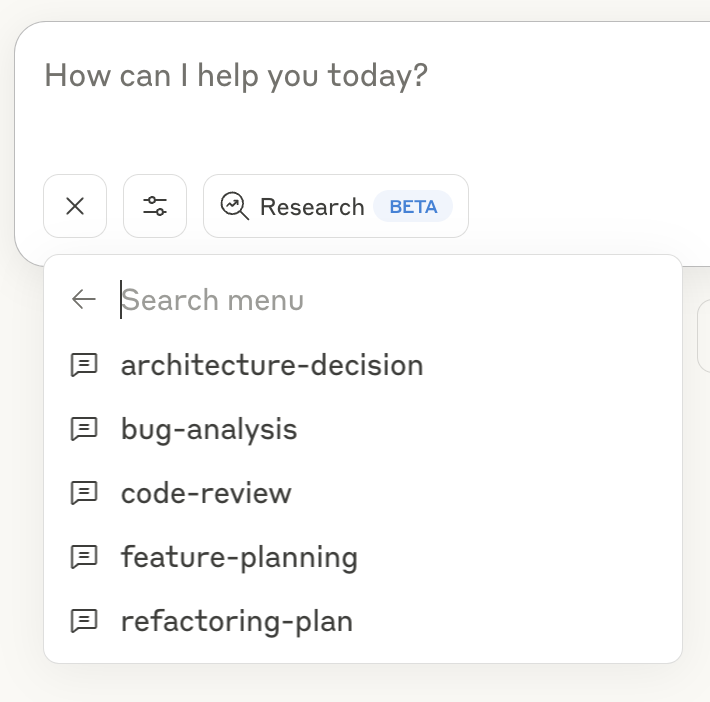
Click the "+" icon in the Claude Desktop chat window, or in Claude Code type
/helpto see the specific commands.Select "Add from Code Reasoning" from the available tools
Choose a prompt template and fill in the required information
Submit the form to add the prompt to your chat message and hit return
See the Prompts Guide for details on using the prompt templates.
Command Line Options
--debug: Enable detailed logging--helpor-h: Show help information
Key Features
Programming Focus: Optimized for coding tasks and problem-solving
Structured Thinking: Break down complex problems into manageable steps
Thought Branching: Explore multiple solution paths in parallel
Thought Revision: Refine earlier reasoning as understanding improves
Safety Limits: Automatically stops after 20 thought steps to prevent loops
Ready-to-Use Prompts: Pre-defined templates for common development tasks
Documentation
Detailed documentation available in the docs directory:
Usage Examples: Examples of sequential thinking with the MCP server
Configuration Guide: All configuration options for the MCP server
Prompts Guide: Using and customizing prompts with the MCP server
Testing Framework: Testing information
Project Structure
Prompt Evaluation
The Code Reasoning MCP Server includes a prompt evaluation system that assesses Claude's ability to follow the code reasoning prompts. This system allows:
Testing different prompt variations against scenario problems
Verifying parameter format adherence
Scoring solution quality
To use the prompt evaluation system, run:
Prompt Comparison and Development
Significant effort went into developing the optimal prompt for the Code Reasoning server. The current implementation uses the HYBRID_DESIGN prompt, which emerged as the winner from our evaluation process.
We compared four different prompt designs:
Prompt Design | Description |
SEQUENTIAL | The original sequential thinking prompt design |
DEFAULT | The baseline prompt previously used in the server |
CODE_REASONING_0_30 | An experimental variant focusing on code-specific reasoning |
HYBRID_DESIGN | A refined design incorporating the best elements of other approaches |
Our evaluation across seven diverse programming scenarios showed that HYBRID_DESIGN outperformed other prompts:
Scenario | HYBRID_DESIGN | CODE_REASONING_0_30 | DEFAULT | SEQUENTIAL |
Algorithm Selection | 87% | 82% | 88% | 82% |
Bug Identification | 87% | 91% | 88% | 92% |
Multi-Stage Implementation | 83% | 67% | 79% | 82% |
System Design Analysis | 82% | 87% | 78% | 82% |
Code Debugging Task | 92% | 87% | 92% | 92% |
Compiler Optimization | 83% | 78% | 67% | 73% |
Cache Strategy | 86% | 88% | 82% | 87% |
Average | 86% | 83% | 82% | 84% |
The HYBRID_DESIGN prompt marginally demonstrated both the highest average solution quality (86%) and the most consistent performance across all scenarios, with no scores below 80%. It also prodouced the most thoughts. The src/server.ts file has been updated to use this optimal prompt design.
Personally, I think the biggest improvement was adding this to the end of the prompt: "✍️ End each thought by asking: "What am I missing or need to reconsider?"
See Testing Framework for more details on the prompt evaluation system.
License
This project is licensed under the MIT License. See the LICENSE file for details.
Appeared in Searches
- Tools and frameworks for thinking about software development
- A server for finding information about sequential thinking
- A tool for critical thinking and devil's advocate analysis of AI model plans
- Tools for slow thinking, step-back reasoning, and contextual memory capabilities
- Resources and Tips for Writing Better R Code