Glama

MCP Redmine

状态:运行良好,日常使用中没有任何已知错误。

状态2:我刚刚把这个包添加到PyPI,并更新了使用说明。如有任何问题,请报告 :)

让 Claude 成为您的 Redmine 助手!MCP Redmine 将 Claude Desktop 连接到您的 Redmine 实例,使其能够:

  • 搜索和浏览项目和问题

  • 使用完整的 Markdown 支持创建和更新问题

  • 上传和下载文件附件

  • 管理和跟踪时间条目

  • 更新问题状态和字段

  • 访问全面的 Redmine API 功能

使用 httpx 进行 API 请求并与 Redmine OpenAPI 规范集成以实现全面的 API 覆盖。
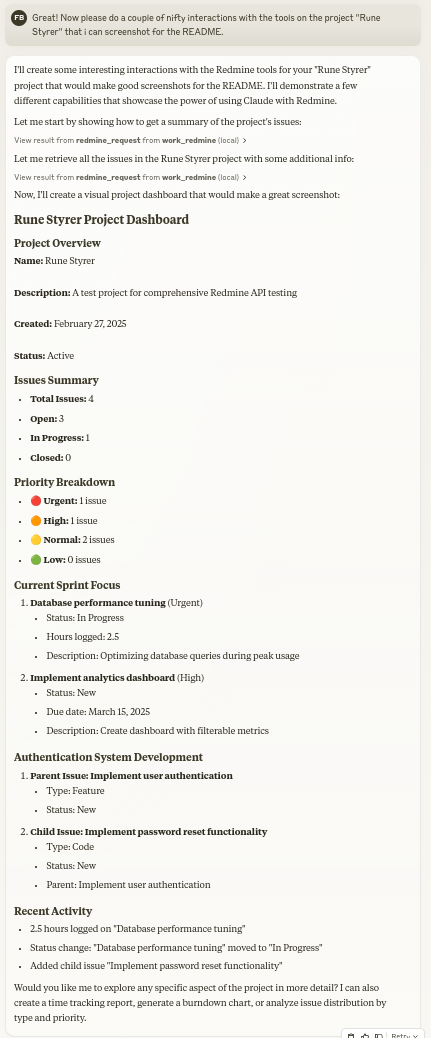
MCP Redmine 实际操作

安装

确保已安装 uv:

# Install uv if you haven't already curl -LsSf https://astral.sh/uv/install.sh | sh

Related MCP server: MCP Alchemy

与 Claude Desktop 一起使用

添加到您的claude_desktop_config.json

{ "mcpServers": { "redmine": { "command": "uvx", "args": ["--from", "mcp-redmine==2025.04.09.153531", "--refresh-package", "mcp-redmine", "mcp-redmine"], "env": { "REDMINE_URL": "https://your-redmine-instance.example.com", "REDMINE_API_KEY": "your-api-key", "REDMINE_REQUEST_INSTRUCTIONS": "/path/to/instructions.md" } } } }

环境变量

  • REDMINE_URL :您的 Redmine 实例的 URL(必需)

  • REDMINE_API_KEY :您的 Redmine API 密钥(必需,请参阅下文了解如何获取)

  • REDMINE_REQUEST_INSTRUCTIONS :包含 redmine_request 工具附加说明的文件路径(可选)

获取您的 Redmine API 密钥

  1. 登录到您的Redmine实例

  2. 前往“我的帐户”(通常位于右上角的菜单中)

  3. 在页面右侧,您应该看到“API 访问密钥”

  4. 单击“显示”查看现有密钥或单击“生成”创建新密钥

  5. 复制此密钥以用于您的配置

API

工具

  • redmine_paths_list

    • 从 OpenAPI 规范返回可用 API 路径列表

    • 无需输入

    • 返回包含路径模板列表的 YAML 字符串:GXP3

  • redmine_paths_info

    • 获取给定路径模板的完整路径信息

    • 输入: path_templates (字符串列表)

    • 返回包含所请求路径的 API 规范的 YAML 字符串:GXP4

  • redmine_request

    • 向 Redmine API 发出请求

    • 输入:

      • path (字符串):API 端点路径(例如“/issues.json”)

      • method (字符串,可选):要使用的 HTTP 方法(默认值:'get')

      • data (对象,可选):请求主体的字典(用于 POST/PUT)

      • params (对象,可选):查询参数的字典

    • 返回包含响应状态代码、正文和错误消息的 YAML 字符串:GXP5

  • redmine_upload

    • 上传文件到 Redmine 并获取附件的令牌

    • 输入:

      • file_path (字符串):要上传的文件的完整路径

      • description (字符串,可选):文件的可选描述

    • 返回与redmine_request格式相同的YAML字符串,包含上传token:GXP6

  • redmine_download

    • 从Redmine下载附件并保存到本地文件

    • 输入:

      • attachment_id (整数):要下载的附件的ID

      • save_path (字符串):文件应保存的完全限定路径

      • filename (字符串,可选):可选文件名(如果未提供则自动确定)

    • 返回带有下载结果的 YAML 字符串:GXP7

示例

创建新问题

Let's create a new bug report in the "Website" project: 1. Title: "Homepage not loading on mobile devices" 2. Description: "When accessing the homepage from iOS or Android devices, the loading spinner appears but the content never loads. This issue started after the last deployment." 3. Priority: High 4. Assign to: John Smith

搜索问题

Can you find all high priority issues in the "Website" project that are currently unassigned?

更新问题状态

Please mark issue #123 as "In Progress" and add a comment: "I've started working on this issue. Expect it to be completed by Friday."

记录时间

Log 3.5 hours against issue #456 for "Implementing user authentication" done today.

贡献

热烈欢迎大家贡献代码!无论是错误报告、功能请求、文档改进还是代码贡献,所有意见都弥足珍贵。欢迎:

  • 打开问题报告错误或建议功能

  • 提交带有改进的拉取请求

  • 增强文档或分享您的使用示例

  • 提出问题并分享您的经验

目标是让 Claude 的 Redmine 项目管理变得更好,您的见解和贡献有助于实现这一目标。

致谢

该项目建立在其他人的出色工作基础之上:

发展

首先克隆 github 存储库并安装依赖项:

git clone git@github.com:runekaagaard/mcp-redmine.git cd mcp-redmine uv sync

然后在 claude_desktop_config.json 中进行设置:

... "command": "uv", "args": ["run", "--directory", "/path/to/mcp-redmine", "-m", "mcp_redmine.server", "main"], ...

执照

Mozilla 公共许可证版本 2.0

我的其他法学硕士项目

  • MCP Alchemy - 将 Claude Desktop 连接到数据库以探索模式和运行 SQL。

  • MCP Notmuch Sendmail - 使用 notmuch 的 Claude Desktop 电子邮件助手。

  • Diffpilot - 具有文件分组和标记功能的多列 git diff 查看器。

  • Claude 本地文件- 访问 Claude Desktop 工件中的本地文件。

One-click Deploy
A
security – no known vulnerabilities
A
license - permissive license
A
quality - confirmed to work

Latest Blog Posts

MCP directory API

We provide all the information about MCP servers via our MCP API.

curl -X GET 'https://glama.ai/api/mcp/v1/servers/runekaagaard/mcp-redmine'

If you have feedback or need assistance with the MCP directory API, please join our Discord server