Enables using Cursor Composer to pull in Rails model files as context and execute database operations. The README states: 'This works great with Cursor. You can use Cursor Composer to pull in your Rails model files as context...'
MCP Server: SSH Rails Runner
An MCP server that enables secure remote execution of Rails console commands via SSH. This server provides tools for both read-only operations and carefully managed mutations in a deployed Rails environment.
This works great with Cursor. You can use Cursor Composer to pull in your Rails model files as context and then use the execute_read_only, dry_run_mutate, and execute_mutate tools to make changes to the database. No need to trudge through complicated Admin UI's to get your data wrangling and analysis done.
Example
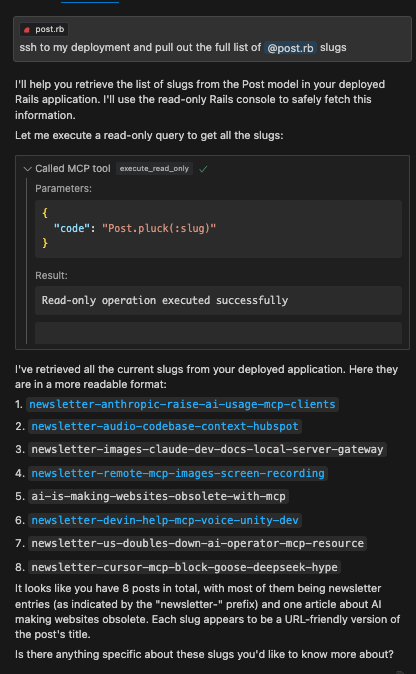
Related MCP server: MCP SSH Server
Features
Remote Rails console execution over SSH
Safe read-only operations
Dry-run capability for mutations
Execution of approved mutations
Resource management for code snippets
Installation
Configuration
Set the following environment variables:
Usage with Claude Desktop
Add to your Claude Desktop configuration:
If CODE_SNIPPET_FILE_DIRECTORY is not provided, snippets will be stored in a temporary directory (e.g., /tmp/mcp-ssh-rails-runner-code-snippets).
PROJECT_NAME_AS_CONTEXT is optional and helps identify the project context in tool descriptions.
Available Tools
The server now uses a Prepare -> Execute workflow:
mcp_ssh_rails_runner_prepare_code_snippet
Arguments:
name(string, for filename),type(enum: "readOnly" | "mutate"),code(string, Ruby code),description(string, optional).Function: Saves the provided Ruby code to a local file named
code_snippet_<name>.json, marks it as read-only or mutate, and opens the file for review.Returns: The
file://URI of the created snippet.
mcp_ssh_rails_runner_execute_code_snippet_read_only
Arguments:
uri(string,file://URI fromprepareCodeSnippet).Function: Reads the code snippet from the URI, verifies it's marked as
readOnly, performs a safety check on the code, and executes it.Returns: The output of the Rails command.
mcp_ssh_rails_runner_execute_code_snippet_mutate
Arguments:
uri(string,file://URI fromprepareCodeSnippet).Function: DANGER ZONE! Reads the code snippet, verifies it's marked as
mutate, and executes it directly. There is no dry run or further safety check within this tool.Returns: The output of the Rails command.
Usage: ONLY CALL THIS AFTER THE USER HAS REVIEWED the prepared code (via the opened file from
Security Considerations
Only use with trusted SSH endpoints from your own local machine that is (temporarily) provided access to the remote environment.
Crucially, always review the code saved by The responsibility for confirming mutations lies with the user and the calling AI.
License
MIT