[Model Context Protocol home page](https://modelcontextprotocol.io/)
Search...
Ctrl K
Search...
Navigation
Developer tools
MCP Inspector
[Documentation](https://modelcontextprotocol.io/docs/getting-started/intro) [Specification](https://modelcontextprotocol.io/specification/2025-06-18) [Community](https://modelcontextprotocol.io/community/communication) [About MCP](https://modelcontextprotocol.io/about)
On this page
- [Getting started](https://modelcontextprotocol.io/legacy/tools/inspector#getting-started)
- [Installation and basic usage](https://modelcontextprotocol.io/legacy/tools/inspector#installation-and-basic-usage)
- [Inspecting servers from NPM or PyPi](https://modelcontextprotocol.io/legacy/tools/inspector#inspecting-servers-from-npm-or-pypi)
- [Inspecting locally developed servers](https://modelcontextprotocol.io/legacy/tools/inspector#inspecting-locally-developed-servers)
- [Feature overview](https://modelcontextprotocol.io/legacy/tools/inspector#feature-overview)
- [Server connection pane](https://modelcontextprotocol.io/legacy/tools/inspector#server-connection-pane)
- [Resources tab](https://modelcontextprotocol.io/legacy/tools/inspector#resources-tab)
- [Prompts tab](https://modelcontextprotocol.io/legacy/tools/inspector#prompts-tab)
- [Tools tab](https://modelcontextprotocol.io/legacy/tools/inspector#tools-tab)
- [Notifications pane](https://modelcontextprotocol.io/legacy/tools/inspector#notifications-pane)
- [Best practices](https://modelcontextprotocol.io/legacy/tools/inspector#best-practices)
- [Development workflow](https://modelcontextprotocol.io/legacy/tools/inspector#development-workflow)
- [Next steps](https://modelcontextprotocol.io/legacy/tools/inspector#next-steps)
The [MCP Inspector](https://github.com/modelcontextprotocol/inspector) is an interactive developer tool for testing and debugging MCP servers. While the [Debugging Guide](https://modelcontextprotocol.io/legacy/tools/debugging) covers the Inspector as part of the overall debugging toolkit, this document provides a detailed exploration of the Inspector’s features and capabilities.
## [](https://modelcontextprotocol.io/legacy/tools/inspector\#getting-started) Getting started
### [](https://modelcontextprotocol.io/legacy/tools/inspector\#installation-and-basic-usage) Installation and basic usage
The Inspector runs directly through `npx` without requiring installation:
Copy
```
npx @modelcontextprotocol/inspector <command>
```
Copy
```
npx @modelcontextprotocol/inspector <command> <arg1> <arg2>
```
#### [](https://modelcontextprotocol.io/legacy/tools/inspector\#inspecting-servers-from-npm-or-pypi) Inspecting servers from NPM or PyPi
A common way to start server packages from [NPM](https://npmjs.com/) or [PyPi](https://pypi.org/).
- NPM package
- PyPi package
Copy
```
npx -y @modelcontextprotocol/inspector npx <package-name> <args>
# For example
npx -y @modelcontextprotocol/inspector npx @modelcontextprotocol/server-filesystem /Users/username/Desktop
```
#### [](https://modelcontextprotocol.io/legacy/tools/inspector\#inspecting-locally-developed-servers) Inspecting locally developed servers
To inspect servers locally developed or downloaded as a repository, the most common
way is:
- TypeScript
- Python
Copy
```
npx @modelcontextprotocol/inspector node path/to/server/index.js args...
```
Please carefully read any attached README for the most accurate instructions.
## [](https://modelcontextprotocol.io/legacy/tools/inspector\#feature-overview) Feature overview
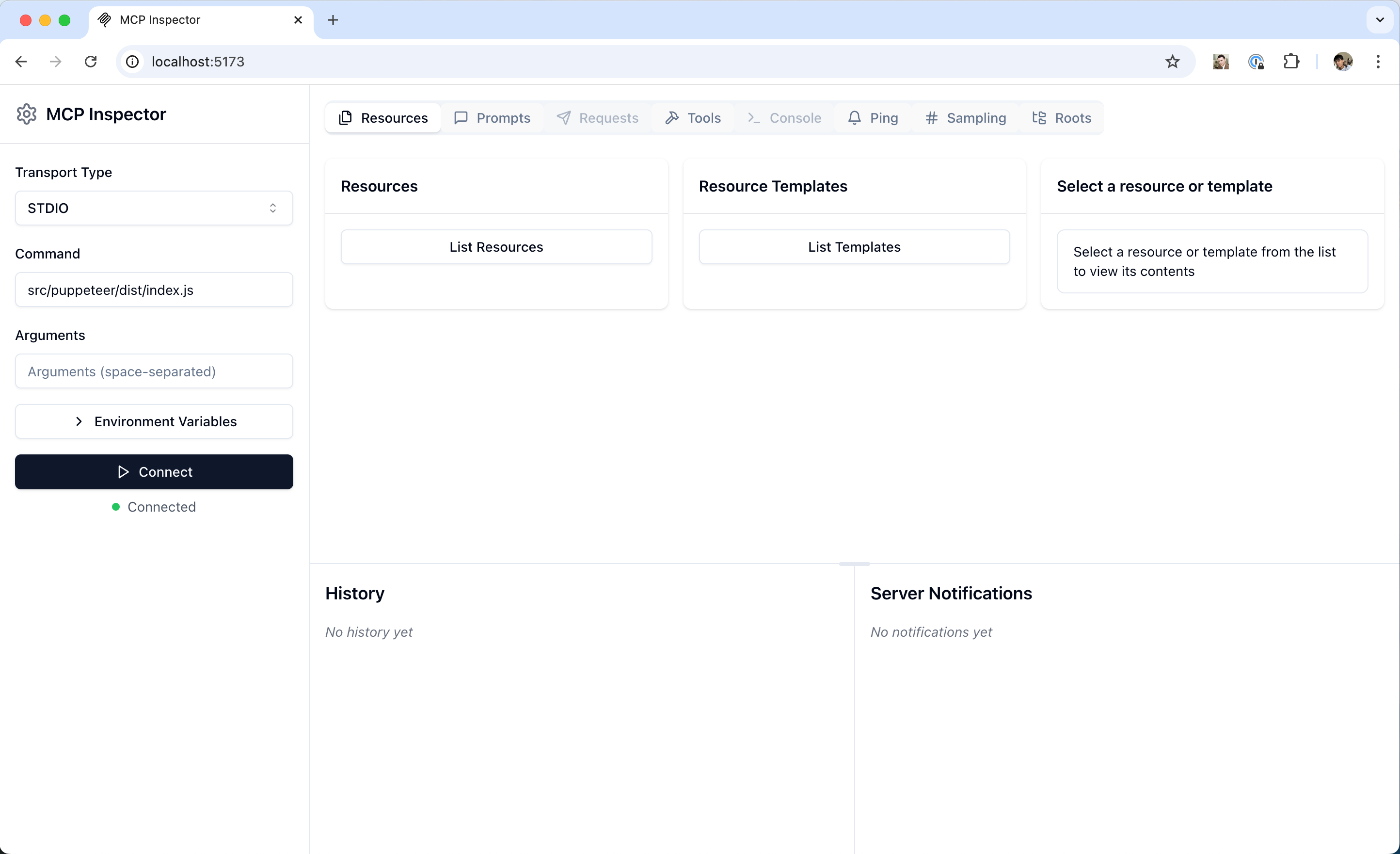
The MCP Inspector interface
The Inspector provides several features for interacting with your MCP server:
### [](https://modelcontextprotocol.io/legacy/tools/inspector\#server-connection-pane) Server connection pane
- Allows selecting the [transport](https://modelcontextprotocol.io/legacy/concepts/transports) for connecting to the server
- For local servers, supports customizing the command-line arguments and environment
### [](https://modelcontextprotocol.io/legacy/tools/inspector\#resources-tab) Resources tab
- Lists all available resources
- Shows resource metadata (MIME types, descriptions)
- Allows resource content inspection
- Supports subscription testing
### [](https://modelcontextprotocol.io/legacy/tools/inspector\#prompts-tab) Prompts tab
- Displays available prompt templates
- Shows prompt arguments and descriptions
- Enables prompt testing with custom arguments
- Previews generated messages
### [](https://modelcontextprotocol.io/legacy/tools/inspector\#tools-tab) Tools tab
- Lists available tools
- Shows tool schemas and descriptions
- Enables tool testing with custom inputs
- Displays tool execution results
### [](https://modelcontextprotocol.io/legacy/tools/inspector\#notifications-pane) Notifications pane
- Presents all logs recorded from the server
- Shows notifications received from the server
## [](https://modelcontextprotocol.io/legacy/tools/inspector\#best-practices) Best practices
### [](https://modelcontextprotocol.io/legacy/tools/inspector\#development-workflow) Development workflow
1. Start Development - Launch Inspector with your server
- Verify basic connectivity
- Check capability negotiation
2. Iterative testing - Make server changes
- Rebuild the server
- Reconnect the Inspector
- Test affected features
- Monitor messages
3. Test edge cases - Invalid inputs
- Missing prompt arguments
- Concurrent operations
- Verify error handling and error responses
## [](https://modelcontextprotocol.io/legacy/tools/inspector\#next-steps) Next steps
[**Inspector Repository** \\
\\
Check out the MCP Inspector source code](https://github.com/modelcontextprotocol/inspector) [**Debugging Guide** \\
\\
Learn about broader debugging strategies](https://modelcontextprotocol.io/legacy/tools/debugging)
Was this page helpful?
YesNo
[SDKs](https://modelcontextprotocol.io/docs/sdk)
Assistant
Responses are generated using AI and may contain mistakes.